
Imagine you just sent your brand-new logo to a printer in Riyadh for a 10-meter billboard, only to have it rejected because the file "fell apart" when enlarged. This scenario is a common nightmare for founders, especially since over 70% of marketing teams have integrated AI into their design workflows as of 2026. If you don't understand the technical divide between a vector vs raster logo, you risk your brand looking amateurish the moment it leaves a smartphone screen.
It's frustrating when a design that looks perfect on your laptop becomes a blurry, pixelated mess in physical print. You deserve a visual system that maintains its premium edge whether it's on a business card or a massive storefront. This guide explains exactly how to navigate file formats like SVG and PNG so you can avoid costly re-design fees later. We'll explore the math behind scalable paths, the limitations of pixels, and how to ensure your logo is truly production-ready for the Saudi market and beyond.
Key Takeaways
- Master the technical divide of a vector vs raster logo to maintain a professional appearance across all digital and physical mediums.
- Identify the "Wrapper Trap" where raster images are disguised as SVG files, preventing you from scaling your brand assets effectively.
- Learn why vector files are the only choice for large-format printing in the Saudi market, ensuring your logo stays sharp on billboards and storefronts.
- Use the 500% Zoom Test to instantly determine if your current logo files are production-ready or require a manual upgrade.
- Bridge the gap between fast AI concepts and premium brand identity by securing handcrafted vector files that are ready for any professional application.
Demystifying the Logo: What Are Vector and Raster Files?
Your brand's visual identity begins with a technical choice that dictates its future flexibility. When comparing a vector vs raster logo, you're essentially choosing between a fixed snapshot and a living set of instructions. Most founders start with raster files without realizing they've hit a ceiling on their brand's growth. In 2026, where 75% of designers use AI tools daily, understanding these building blocks is the difference between a temporary concept and a premium brand.
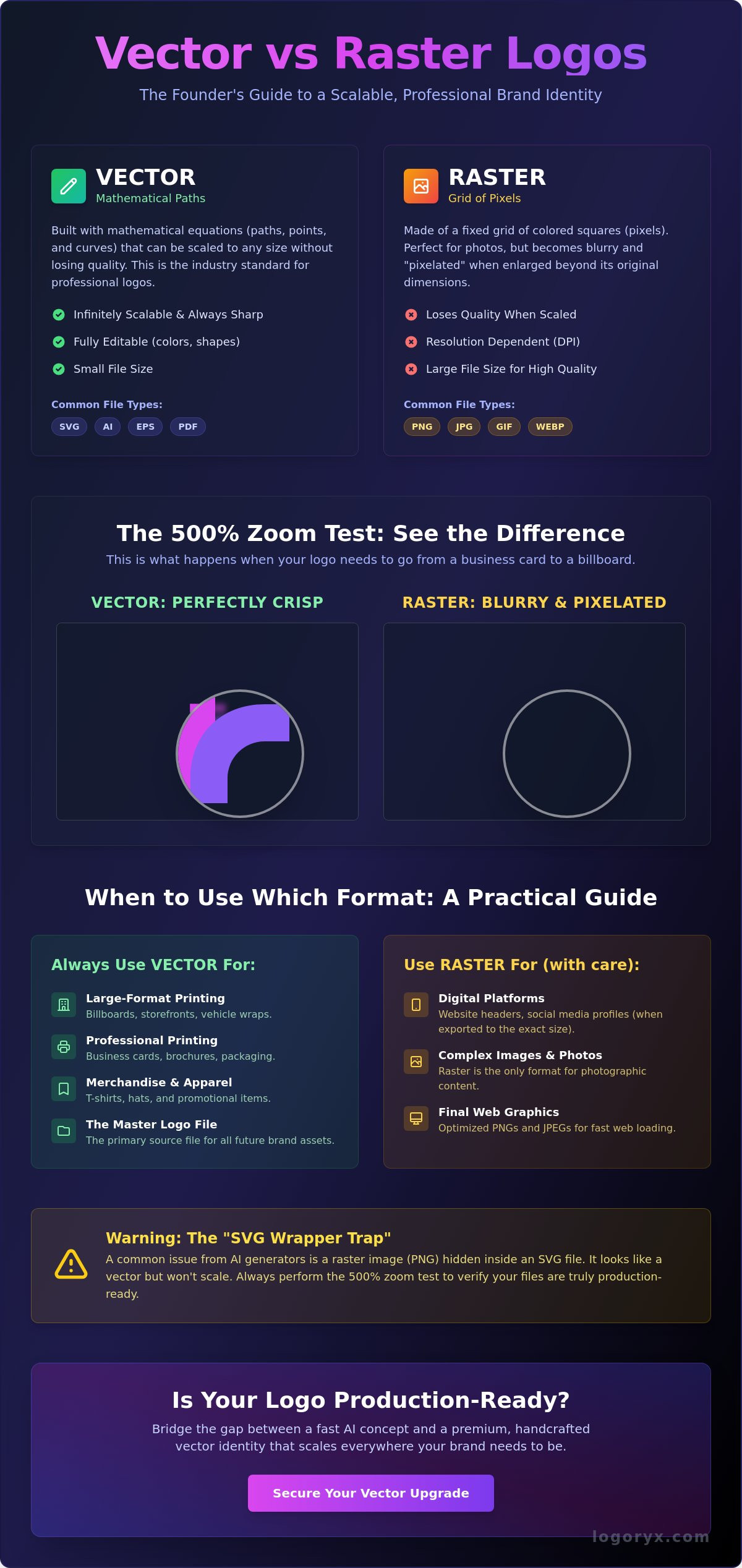
Think of a raster file like a mosaic. It's composed of thousands of tiny colored tiles, or pixels, arranged in a specific grid. This structure is perfect for complex textures and photographs, but it's rigid. If you try to stretch that mosaic to fit a larger wall, the gaps become visible and the image loses its crispness. Common raster extensions include PNG and JPG. These are excellent for social media avatars or website headers where the size is small and fixed, but they fail when your business needs to think bigger.
Vectors take a completely different approach. Instead of pixels, they use mathematical paths. A vector file tells your computer exactly where a line starts, how it curves, and where it ends. This mathematical precision allows for infinite scaling. Whether you're printing on a business card or a massive display in Riyadh's Boulevard City, the lines remain razor-sharp. Professional designers use AI, EPS, and SVG formats for this reason. Vectors are the industry standard because they ensure your visual system remains solid across every possible medium.
Understanding Raster Graphics (The Pixel World)
Raster graphics rely on a fixed resolution. This is often measured in DPI (Dots Per Inch). For a standard digital screen, 72 DPI is common, while high-quality printing in Saudi Arabia usually requires 300 DPI. The trap for many founders is that you can't simply "add" resolution to a raster file. If you have a 72 DPI PNG logo, trying to print it on a large banner will result in visible pixelation. This is why photographs are always raster; they capture millions of unique color variations that math can't easily replicate. However, for a logo, this fixed nature is a liability that leads to blurry, unprofessional results.
Understanding Vector Graphics (The Math World)
The magic of vectors lies in Bezier curves and anchor points. For a comprehensive overview of vector graphics, you can see how these points define shapes through coordinates rather than color blocks. This makes vector files incredibly efficient. A vector file of a complex logo often has a smaller disk size than a high-resolution PNG because it's storing equations, not millions of pixels. In modern web design, SVGs are essential because they can be manipulated with CSS and stay crisp on high-density displays. Shifting from a raster concept to a handcrafted vector asset is the first step in creating a production-ready brand that scales effortlessly.
Resolution Independence: Why Vectors Win for Scalable Branding
Resolution independence is the ability of a graphic to maintain its visual integrity at any size. For a founder, this is a form of brand insurance. When you evaluate a vector vs raster logo, you are deciding whether your brand will be confined to a small box or free to occupy any space you choose. A vector file ensures that your mark stays sharp whether it's on a 2-centimeter business card or a massive skyscraper wrap in Riyadh's financial district. This flexibility is essential for a growing company that needs to move fast without hitting technical roadblocks.
Beyond size, vectors offer unparalleled editability. Because they are based on mathematical coordinates, changing a brand's color palette or adjusting a single curve is a precise, instant process. In a raster file, these changes often require tedious, manual pixel manipulation that can leave artifacts or "ghosting" around the edges. Professional brand identity systems rely on vectors because they are truly production-ready. They meet the strict requirements of high-end printers and fabricators who need clean paths for specialized finishes like foil stamping or 3D signage. If you're starting with a digital concept, securing a manual vector upgrade is the most efficient way to bridge the gap between a quick idea and a professional asset.
The Problem with Scaling Raster Logos
When you enlarge a raster logo, the software must perform interpolation. This is a process where the computer "guesses" what the new pixels should look like based on the existing ones. The result is almost always a blurry, soft edge that devalues your brand's perceived quality. Even modern AI upscaling tools, which have improved significantly as of 2026, still struggle with the mathematical perfection required for a logo. They often introduce small hallucinations or "noise" that a trained eye can spot instantly. This lack of precision signals a lack of professionalism to your clients and partners.
Vector vs Raster: A Technical Comparison
The technical advantages of vectors extend into every corner of modern marketing. In terms of web performance, SVG files are often much smaller than high-resolution PNGs because they store simple code instead of millions of individual color squares. This leads to faster page load speeds, which is a critical factor for SEO and user experience. For physical production, vectors are non-negotiable for the following uses:
- Embroidery: Stitching machines follow the paths defined in a vector file.
- Laser Cutting: Clean mathematical lines are required for precise cuts in metal or wood.
- 8K Displays: As screen density increases, only vectors remain perfectly crisp without needing massive, slow-loading raster files.
Future-proofing your brand means preparing for displays and mediums that haven't even been invented yet. By prioritizing a vector-first workflow, you ensure your visual system remains solid and adaptable for the long term.
The 'Blurry Logo' Problem: Identifying Your Current File Type
Many founders in Saudi Arabia discover their logo's technical limitations only after receiving a rejection from a professional printer. This gap is common; as of May 2026, over 70% of marketing teams have integrated AI into their design workflows, often producing initial concepts in raster formats. To avoid the stress of a pixelated brand identity, you need a reliable way to evaluate your vector vs raster logo files before committing to a high-cost production run. Identifying your file type early prevents expensive mistakes and ensures your visual system remains solid across all mediums.
The 500% Zoom Test for Founders
You don't need the latest Adobe Illustrator (v30.4) to diagnose your file. Simply open your logo in a standard web browser or a system preview tool and zoom in to 500%. Look closely at the curves and edges. If you see jagged, stair-stepped patterns, which is a phenomenon known as aliasing, you are looking at a raster file. A true vector maintains a perfectly smooth, razor-sharp edge regardless of the magnification level. This simple test is the fastest way to see if your brand asset is ready for high-stakes applications like billboard advertising in Riyadh or premium storefront signage.
The 'SVG Wrapper' Trap
A common misconception is that an .SVG extension automatically guarantees infinite scalability. Unfortunately, it's possible to "wrap" a raster image inside an SVG container without actually converting the pixels into mathematical paths. This "wrapper trap" is why some files still appear blurry even when labeled as an SVG. To verify your file, check if you can select individual elements of the design. If the entire logo moves as one solid block and you can't isolate specific curves, it's likely just a pixel-based image hiding in a vector shell. Simply resaving a PNG as an SVG does not solve the underlying resolution problem; it only disguises it.
Another quick diagnostic involves checking the file properties. On a Windows machine, right-click the file, select "Properties," and navigate to the "Details" tab. If you see "Dimensions" measured in pixels, such as 1024 x 1024, or a specific "DPI" (Dots Per Inch) value, you are dealing with a raster graphic. True vectors are resolution-independent and won't list these fixed constraints. If your diagnostic reveals a pixelated mess, it's a clear signal that your brand requires a handcrafted, production-ready upgrade to move from a digital concept to a premium brand identity that scales effortlessly.
When to Use Raster vs Vector: A Practical Use-Case Guide
Choosing between a vector vs raster logo isn't about deciding which is better in a vacuum; it's about matching the right tool to the specific medium. While your master asset should always be a vector, your day-to-day marketing operations often require raster exports for compatibility. In the fast-paced Saudi market, where digital presence and physical grandeur collide, knowing which file to send to a developer versus a printer saves time and protects your brand's reputation. As of 2026, over 70% of marketing teams have integrated AI into their workflows, making it even more critical to distinguish between a quick digital draft and a production-ready asset.
Digital-First Branding: Raster's Stronghold
Raster files, specifically PNGs, are the workhorses of your digital ecosystem. Most social media platforms and website builders are designed to handle pixels, not complex mathematical paths. When you upload a profile picture to LinkedIn or Instagram, you're using a raster file. These formats are ideal because they support transparency, allowing your logo to sit cleanly over different background colors without a white box around it. For web performance, a well-optimized PNG ensures your site loads quickly on mobile devices across the Kingdom, keeping bounce rates low. 75% of designers report using AI tools daily to generate these quick-use assets, but they always keep the vector original as the primary source of truth.
Print and Physical Assets: Vector's Domain
The moment your brand moves into the physical world, vectors become non-negotiable. If you're commissioning a vehicle wrap for a delivery fleet in Jeddah or a massive billboard along King Fahd Road, the printer will demand a vector file like an SVG or AI. This is because these machines need precise paths to follow, whether they're cutting vinyl or spraying ink. A vector vs raster logo choice here determines if your signage looks crisp or amateurish. For merchandise like embroidered polo shirts or screen-printed hoodies, vector files provide the map the needles and screens need to produce a clean result. Building a brand identity design requires a full vector system to ensure your typography and iconography remain sharp on everything from a business card to a stadium screen.
For high-stakes presentations and pitch decks, vectors help you maintain quality without bloating the file size. An SVG logo in a PDF stays sharp at any zoom level, which is critical when presenting to investors who might view your deck on a high-resolution 8K display. If you currently only have pixel-based drafts from an AI generator, you're essentially holding a low-resolution map of a high-resolution future. To move from a concept to a production-ready brand, you should upgrade to a handcrafted vector logo today to ensure your brand is prepared for every growth opportunity.
From AI Concept to Production-Ready: The Logoryx Hybrid Solution
The rise of generative design has transformed how startups launch. As of May 2026, the AI logo generator market has reached a valuation of 0.73 billion SAR, reflecting a massive shift toward rapid, automated concepting. However, this speed often comes with a technical compromise known as the "AI Gap." While an algorithm can generate a stunning visual in seconds, it almost always outputs a raster file composed of fixed pixels. To move from a digital draft to a premium brand identity, you must navigate the vector vs raster logo divide by securing an asset that is truly production-ready.
Logoryx bridges this gap by combining technological efficiency with artisanal quality. We understand that a founder's journey is modular. You need to start fast, but you also need the confidence that your brand won't break when it's time to scale. Our "Upgrade Anytime" philosophy allows you to experiment with AI-powered ideas without the long-term risk of being stuck with low-resolution files. We take the "best of both worlds" approach, ensuring your immediate needs are met while preparing your visual system for the highest professional standards.
Bridging the Gap Between AI and Print
Most automated tools lack the ability to create the clean, mathematical paths required for high-end manufacturing. A 75% majority of professional designers now use AI tools daily, but they use them as a starting point, not a finish line. At Logoryx, our designers take your initial concepts and manually refine them into handcrafted Bezier curves. This human-crafted precision is essential for creating a "solid" SVG file that a printer in Riyadh or a developer in Dubai can use without errors. You can use our AI logo generator for initial concepting, knowing that a professional upgrade is always available.
Your Scalable Brand Roadmap
Scalability is the silent engine of brand growth. Once you have a polished vector asset, you have the foundation for a complete brand identity design that works across every possible medium. Managing these assets effectively ensures that as your team grows, your brand remains consistent and premium. Storing your master vector files in a secure, encrypted infrastructure prevents the common "blurry logo" issues that plague startups as they expand into physical signage and 8K digital displays. Don't let your brand be limited by pixels. You should upgrade your AI logo to a professional vector file today to ensure your visual system is ready for the world stage.
Secure Your Brand’s Scalable Future
Your brand shouldn't be limited by the fixed resolution of a digital draft. Mastering the technical divide between a vector vs raster logo ensures your visual system remains razor-sharp across every medium. Whether you're preparing for a massive billboard display in Riyadh or a simple smartphone favicon, having production-ready assets is the foundation of professional growth. You've learned how pixels fail when scaled, while mathematical paths provide the infinite flexibility your startup demands for its long-term journey.
You can graduate from initial AI concepts to a premium brand identity without the traditional agency overhead. Over 5,000 founders worldwide have already trusted our hybrid approach to secure expert, human-crafted SVG and EPS files that meet the highest industry standards. It's time to ensure your mark is solid and adaptable for the long term. Ready to scale? Upgrade your AI logo to a production-ready vector file now. Your brand's future is too important to leave to chance; start with speed and scale with precision.
Frequently Asked Questions
Can I convert a raster logo to a vector file automatically?
Automatic conversion is possible through "Image Trace" features in software like Adobe Illustrator (v30.4), but it rarely produces production-ready results. These tools often create thousands of unnecessary anchor points and jagged edges that look amateurish upon close inspection. For a premium brand identity, manual refinement by a designer is essential to ensure the Bezier curves are clean, efficient, and ready for high-end printing.
Is a high-resolution PNG as good as a vector file?
No, a high-resolution PNG is never a substitute for a vector file because it remains bound by a fixed grid of pixels. Even a 300 DPI file will eventually blur if you scale it beyond its original dimensions. In the vector vs raster logo debate, vectors always win for scalability because they use mathematical equations to redraw the image perfectly at any size, from a favicon to a skyscraper.
Why did my printer ask for an EPS file instead of a JPEG?
Printers require EPS files because they contain the precise mathematical paths needed for physical fabrication and high-quality ink application. Unlike JPEGs, which are flat snapshots, EPS files provide instructions that machines use to cut vinyl or engrave metal with 100% accuracy. Professional signage companies in Riyadh or Jeddah won't accept JPEGs for large-scale production because the risk of pixelation is too high for their standards.
Does an SVG file lose quality when I resize it?
No, an SVG file is resolution-independent and will never lose quality regardless of how much you resize it. Because SVGs store shapes as code rather than colored squares, they remain perfectly sharp whether they occupy 16 pixels or 16,000 pixels. This technical advantage makes them the gold standard for responsive web design where logos must adapt to various screen densities without losing their polished edge.
What is the best file format for a website logo?
SVG is the best format for a modern website logo because it offers the sharpest appearance on high-density displays while maintaining a tiny file size. It helps improve page load speeds, which is a critical factor for SEO and user experience in 2026. If your site needs to support legacy systems, a transparent PNG serves as a reliable fallback, though 75% of designers now prioritize SVG-first workflows for digital assets.
Can I open a vector file without professional design software?
Yes, you can open and view vector files like SVGs directly in any modern web browser like Chrome or Safari. While you need specialized software like Inkscape (v1.4.4) to edit the paths, browsers render the vector data perfectly for viewing. For EPS or AI files, standard PDF viewers or system preview tools can often display the graphic, allowing you to verify the asset without a professional toolkit.
How much does it cost to have a logo vectorized manually?
The cost for manual vectorization varies based on the complexity of your design and the turnaround time required. While automated tools are often free, they don't provide the "human-crafted" precision necessary for production-ready assets. Investing in professional vectorization ensures your visual system is free of technical artifacts and optimized for every medium. Many founders choose a hybrid approach to balance speed with high-level design quality.
What happens if I use a raster logo on a billboard?
Using a raster logo on a billboard results in visible pixelation where the individual pixels become large, blurry squares. This "stair-stepping" effect devalues your brand's perceived quality and often leads to the printer rejecting the file entirely. A vector file is the only way to ensure your brand looks solid and premium on large-scale displays like those found in Riyadh's Boulevard City.